
MacBook Stopped Loading macOS Banana Contamination
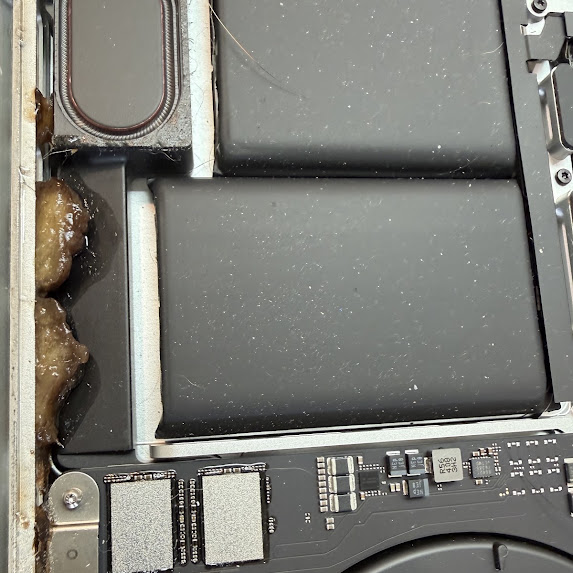
MacBook Stopped Loading macOS After Banana Contamination
MacBook stopped loading macOS after an unusual accident involving banana contamination inside the laptop.
A MacBook that suddenly stops loading macOS can have a storage, software or logic-board problem. In this recent repair at LaptopFixNZ, however, the cause was much more unusual.
The customer had a banana inside the same bag as the MacBook. When the laptop was placed into the bag, the banana was accidentally crushed.
Banana residue made its way inside the MacBook and reached the logic board around the SSD and storage area.
After the contamination, the MacBook stopped loading macOS correctly.
What We Found Inside the MacBook
When we opened the MacBook, there was significant banana residue inside the laptop.
The contamination had reached the logic board around the SSD and storage components.
Because the MacBook had stopped loading macOS after this happened, the first step was to inspect the affected area properly rather than treating it as a simple software problem.
Cleaning the Logic Board and SSD Area
We carefully cleaned the contaminated area of the logic board and removed the banana residue from around the SSD and surrounding components.
Food contamination inside a laptop can be particularly problematic because residue and moisture can remain around small electronic components and connections.
Once the affected area had been cleaned, we inspected the board and storage area before continuing with the repair.
Restoring macOS
After cleaning the affected area, we addressed the storage-related problem and reinstalled macOS.
The MacBook was then tested to make sure the operating system loaded correctly and the laptop operated normally.
The result: the MacBook is now loading macOS and working perfectly again.
Can Food Inside a MacBook Cause Problems?
Yes. Liquid spills are a common cause of MacBook damage, but food and other contamination can also cause problems if they get inside the laptop.
Depending on where the contamination reaches, possible symptoms can include:
MacBook not loading macOS
MacBook not turning on
storage or SSD problems
charging problems
unexpected shutdowns
keyboard or trackpad faults
logic-board problems
Even if a MacBook appears to continue working immediately after an accident, residue left inside can potentially cause problems later.
Why Proper Diagnosis Matters
A MacBook that will not load macOS does not necessarily have only a software problem.
Storage faults, contamination and logic-board faults can sometimes produce similar symptoms.
In this case, opening the MacBook revealed the contamination around the storage area and helped identify the cause of the problem.
This is why proper diagnosis is important before assuming that reinstalling macOS alone will solve the issue.
What Should You Do If Food or Liquid Gets Inside Your MacBook?
If food, liquid or another substance gets inside your MacBook, avoid repeatedly turning it on or charging it unnecessarily.
If contamination has reached the internal electronics, continued use can potentially make the problem worse.
Having the MacBook inspected allows the affected area to be checked and cleaned before additional faults develop.
Need Help With a MacBook Problem?
LaptopFixNZ provides MacBook diagnostics and repair from our workshop in Wigram, Christchurch.
If your MacBook will not start, will not load macOS, or has suffered contamination, we can inspect it and advise on the appropriate repair options.
For general repairs, see our MacBook Repair Christchurch page. For board-level faults, visit our MacBook Logic Board Repair Christchurch page.